
 Great question. But to understand the answer, we need to go back in time (so to speak).
Timecode is what makes precision video editing possible. Without a precise address for every frame of video, editing would be essentially random.
Fortunately, many decades ago, timecode was invented to solve that exact problem. With timecode, each frame was given a timecode reference unique from every other frame in that clip.
NOTE: Film actually began this process when Kodak numbered every frame of negative film. These “edge numbers” were used to match and convert the workprint edit, created by the film editor, into the negative master, created by the negative cutter, which was then used to create distribution prints for theaters.
In “those early days,” video was not stored on servers, but magnetically on video tape.
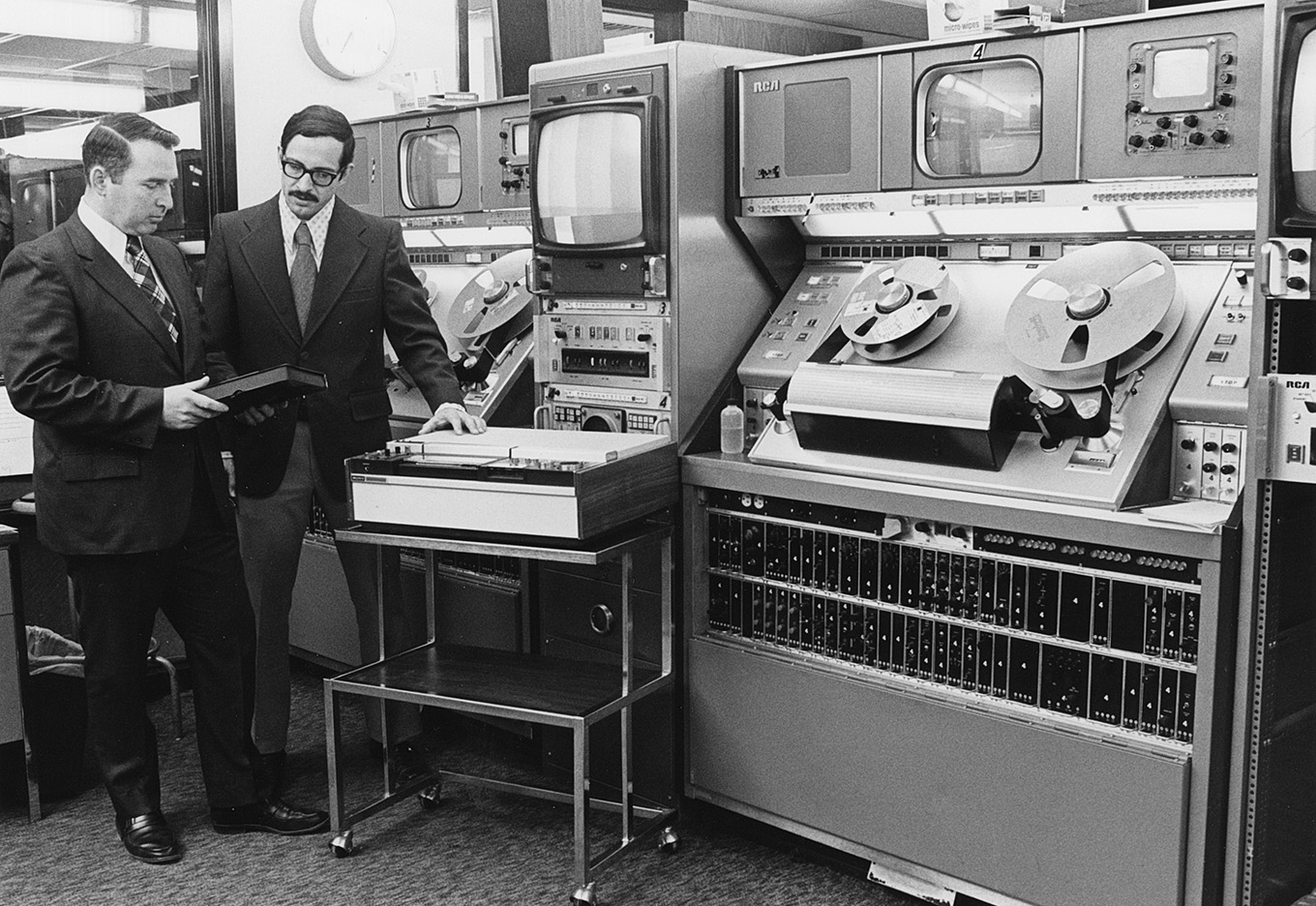
Two 2″ quad RCA TR-70 video tape machines at WHA-TV, Madison, Wis. in 1974. Dave Graham, Chief Engineer, on left. The other engineer is resting his hand on a Sony U-Matic 3/4″ video cassette deck. These were used for off-line review and editing. Dave is holding a 3/4″ video cassette box.
Those giant video tape machines, manufactured by RCA (above) or Ampex, cost upwards of $250,000 each (about $1.8 million in today’s dollars), and we needed three of them to edit!
Each weighed 1,800 pounds and held reels of 2″ wide magnetic tape, weighing 15-20 pounds per reel. The tape traveled through the system at 15 inches per second. (All, I might add, to record or playback an SD signal!!) Video, audio and timecode were each recorded in their own horizontal “stripe” along the length of that 2″ tape.
(Um, no, I haven’t forgotten about timecode… be patient.)
These reels of tape were so heavy that it took several seconds to get them running at full speed. Even more challenging, every tape machine needed to be calibrated before playing or recording each tape.

Color bars for standard definition color television.
These provided very specific video scope settings used for calibrating playback.
To do that, we would record 60 seconds of color bars and audio tone (“bars & tone”) at the beginning of each tape, followed by ten seconds of black, ten seconds of a slate to identify the contents of the tape, followed by a countdown from 10 to 0, which would be used for cuing.
2″ tape machines would generally take eight seconds to get up to speed, which meant we need to start playback (“roll tape”) eight seconds before it went on air. (Film islands took three seconds, 1″ machines took about a second, and servers, today, are instantaneous.)
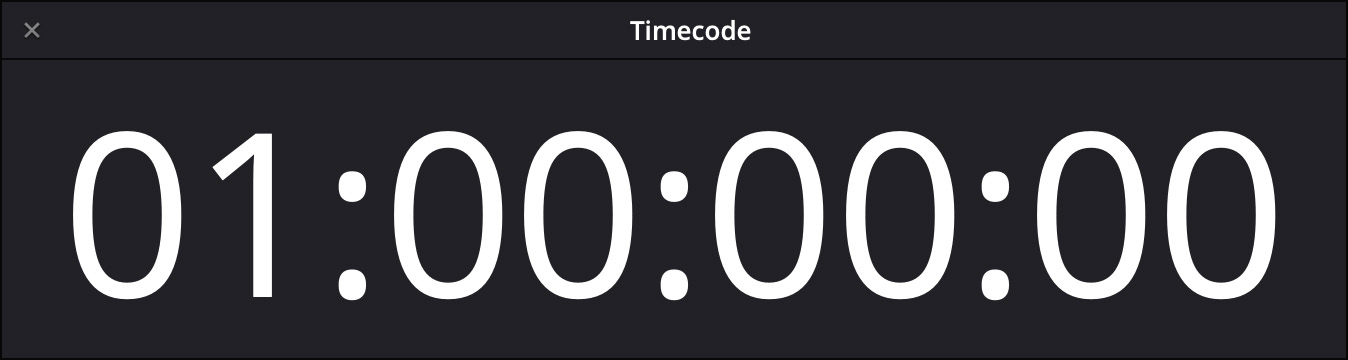
OK, back to timecode. Because all video tape used timecode to figure out where it was, if the program started at 0:00:00:00, that meant that the engineering calibration material (which ran a minute and a half), would be recorded at timecode 23:58:30:00.
But… there’s no way a simple timecode sensor could understand that 23 hours came BEFORE 00 hours.
So, to solve this conundrum, all video tape would record pre-show material starting at 00:58:30:00, with program starting at 1:00:00:00.
NOTE: In those days, all new tapes were “burned in” (recorded with timecode, black video and silent audio) before being put into service. The job of tape engineers at night was burning-in (also called “burnishing”) the tapes needed for production the next day.
Today, where video playback runs off servers – even for broadcast – while there is still a critical need for timecode, there’s no need for that pre-show calibration material because servers don’t need calibration. So, all current NLEs default to a starting timecode of 00:00:00:00.
NOTE: While there is often a need in production to record slates and color references before each camera shot, where the timecode starts for that recording doesn’t matter.
However! If you ever need to set starting timecode to a different number, you can. Here’s how.
FINAL CUT PRO
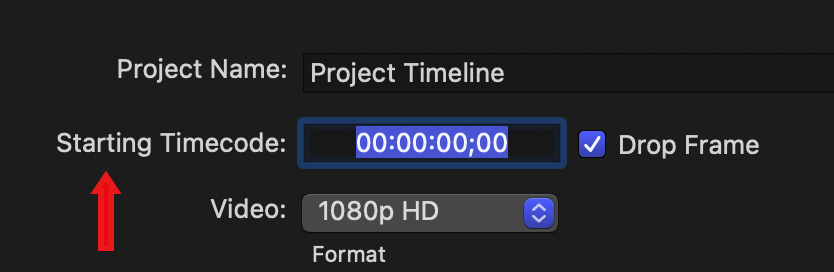
In Final Cut, open Project Settings and change the starting timecode to the number you want. While it is traditional for timecode to start on the hour, you can actually have timecode start at any number you want.
NOTE: Keep in mind that if you change timecode for a video that has subtitles, those subtitles will lose their timecode reference to the video.
PREMIERE PRO
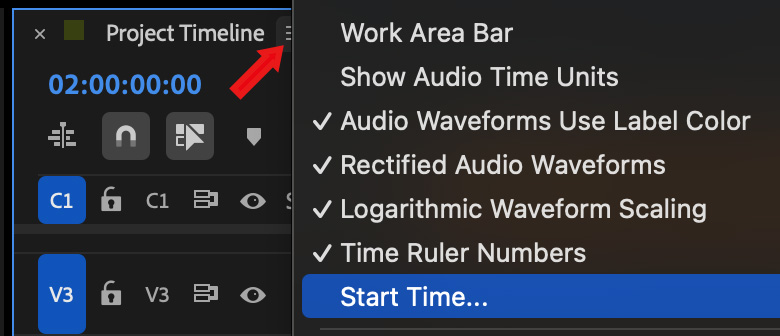
Open any sequence into the timeline and click the “three hamburgers” next to the sequence name (red arrow).
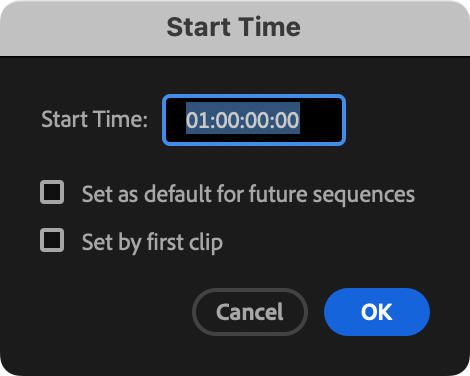
In the Start Time dialog, change the starting timecode.
DAVINCI RESOLVE
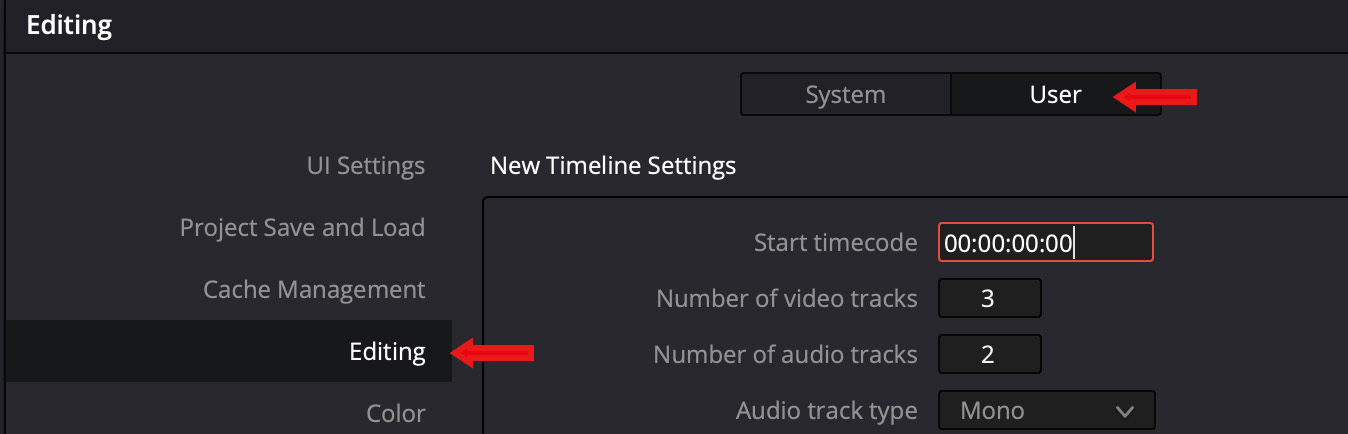
To change the default timecode in Resolve, go to DaVinci Resolve > Preferences > User > Editing. The default timecode is project based.
SUMMARY
It is certainly easier watching video with instantaneous playback, and, today, all our video gear is massively smaller. Still, there was something magical about walking through a machine room filled with those huge, noisy, custom air-conditioned machines with tape spinning madly through them and seeing the magic held on those magnetic tapes.
Though today’s technology is so much superior in every possible way – I truly do miss those old machines. Still, I’m glad I don’t have to go back.



19 Responses to Why Does Timecode Sometimes Start at 1:00:00:00 and Should It Start There Today?
Newer Comments →-
 Dave Muehsam says:
November 17, 2025 at 6:14 am
-
 Jan de Bloois says:
November 17, 2025 at 6:16 am
-
 Brendan Deere says:
November 17, 2025 at 7:53 am
-
 Larry says:
November 17, 2025 at 7:58 am
-
 Andrew Findlay says:
November 17, 2025 at 8:17 am
-
 Larry says:
November 17, 2025 at 8:49 am
-
 Paul says:
November 17, 2025 at 9:03 am
-
 Paul Folger says:
November 17, 2025 at 9:48 am
-
 Barry Shea says:
November 17, 2025 at 12:23 pm
-
 Larry Jordan says:
November 17, 2025 at 1:16 pm
-
 mark suszko says:
November 17, 2025 at 3:01 pm
-
 Larry says:
November 17, 2025 at 3:49 pm
-
 KIM DOHUN says:
November 17, 2025 at 7:16 pm
-
 Larry says:
November 17, 2025 at 8:13 pm
-
 Philip Snyder says:
November 24, 2025 at 7:56 pm
-
 Gil says:
November 18, 2025 at 8:58 am
-
 Larry says:
November 21, 2025 at 10:30 am
Newer Comments →Thanks for the quick trip down Memory Lane. I never heard of “burnishing.” In Burbank, we called it “black and code.”
Yes, it’s the same with my old Teac A-3300 SX. I recently sold it, after sitting over 20 years in a closet. I can do more, faster and better audio editing on my iPad using GarageBand. Back in those days I made slideshows with 35mm color slides. A lot has changed.
Was trained and bought up on 1” VTRs along with their u-Matic counterparts, Betacam had just launched and making inroads to the (Broadcast) environment. It was fun using tape decks (with pre-roll) alongside 8-track reel to reel recorders and chase synchronisers. Always liked the pre-roll as you had a five second countdown to your edit point before the (magic) event occurred. Made you think more about your selection. Thanks for the article. (from PAL land – UK).
Brendan:
Yup. There was something more “deliberative” about doing an edit with a pre-roll. It made the edit seem more final, somehow.
Larry
I’m old enough to remember those 2 inch “quad” machines – operated by specialist technicians. As film editors we were slightly smug that we could edit non-linearly and we resented when the relatively cheap U-matic cassettes came in, as we were forced to edit one tape to another, one shot onto the previous shot and then go back and drop in insert edits. Any changes required copying the whole show and making any adjustments as you progressed through the programme. BTW, in UK we use 10 O’clock timecode for master transmission tapes, so bars and tone were from 09:58:00:00 with programme start at 10:00:00:00.
Andrew:
That’s a good point about 10:00 timecode. The reason, I suspect, was that it became very easy to tell which programs originated in the UK vs US. (Though, perhaps, the PAL format might have given that away.)
Larry
One of my jobs when I started as an AE was to black (and code) tape. Forgot about that until you mentioned it in the article.
Fun article. I was a field audio tech, and it was my job to bar and tone tapes during the shoot. This was in the Beta SP days. We used the hour value to indicate tape number. Thanks for the trip down memory lane.
Yes, quite a memory-sparking article!
I started my career with an Ikegami camera on one shoulder, and a 3/4″ recorder hanging on the other.
Betacam was a godsend: All the weight went on ONE shoulder, and with an internal tape cassette!
In Miami, we “blacked” tapes for editing.
Maybe Larry can cover McBeth color charts, white cards for color balancing, and “burning” the camera to try and get sun streaks out of the tubes in the next article.
Then, colons vs semicolons.
Barry:
Smile… colons vs. semi-colons is FAR less controversial.
Larry
A quibble; the countdown after the slate very commonly stopped at two, not zero, going to black for the last two seconds of the ten second countdown meant less chance of a technical director cutting to the source early and showing the numbers counting down, and also, especially in news and live broadcasts, you would pre-cue the tape to be rolled-in at the “2-pop”, so when you hit play and take nearly simultaneously, that source tape would hit right as you faded it into the program.
One more semi-useful time code tip that can still be worth your while: if you set the camera’s time code generator to Time Of Day, and “Free Run”, all the cameras wherever they are, will be more or less synchronized to your wrist watch. Wherever you are during the shoot, you can log a particular take with the time on your watch and not need to see a smart slate or the control panel on the side of the camera. This used to be super vital in news gathering, but is still a good tip for reality shows or multi camera sports and such. Sure, today’s NLE’s can synch up multiple cameras just by their audio waveforms. But what if some of the cameras don’t HAVE audio? And the logging aspect is always of use.
Mark:
Smile… As I was writing this I debated whether to say that the countdown went from 10 – 0 or 10 – 2. I chose 10 – 0 because I didn’t want to add the paragraph you just so beautifully wrote to an article that was about timecode. Still, I told myself, “as soon as you write 10 – 0, Mark is gonna take you to task for it.” You are, of course, correct. The countdown stopped 2 seconds before program start to prevent putting a technical countdown on air.
However, with both 2″ and early 1″ machines, they could not get up to speed in two seconds, so we really need to give them an 8 – 10 second preroll to achieve speed and picture lock. Only youngsters like yourself got to work with the newer machines that locked up in a second or so.
I also really like your “Time of Day / Free Run” tip. Logging tapes on set with accurate timecode saves HOURS in the edit bay later.
Thanks,
Larry
I started working in South Korean production in 2004. One of the first rules I learned was how to specify timecode when shooting on 40-minute tapes (BETACAM SP, Digital BETACAM, DVCAM).
1. Set the timecode mode as Rec Run when shooting.
2. When changing tapes, go into the timecode settings and increment the time by 1 so that the timecode time matches the tape number.
Examples:
Tape#01 –> Starts at 01:00:00;00
Tape#13 –> Starts at 13:00:00;00
Kim:
Thanks for your story.
Larry
We used to tell production companies to log the 3/4″ tape transfers of the dailies that way. So each 10 minute reel of 35 mm. dailies would have its own 3/4 ” cassette with hourly advancing time code plus OCN edge numbers.
The article and comments bring back some early career memories for me. I worked at a TV station owned by a couple of guys who owned radio stations. The folk wisdom was that such owners were cheapskates in the TV world. That was kind of the case.
I started in the late ’80’s and we had a quad tape machine that our engineers had to fire-up from time to time because we had no 1″ machine! We would get commercials from Proctor & Gamble and a few other companies on quad. We actually got some spots for the ’88 Olympics that way.
We used 3/4″ tape for everything else – offline editing, our production room and master control. However we used low-end machines, so, no time code. We just reset the control-track time counter on the machines as needed. Things worked out pretty well, considering.
In our master control room, we had 8 3/4 inch machines we switched between for programming and commercials. We cued tapes to :03 before first video. I worked in Master Control for a time, we took pride in being able to stay in sync with starting successive machines so the commercial breaks and programming were seamless.
Timecode was kind of a dream for us because, like I said, our owners were cheap.
(Eventually, new owners purchased the station in the mid 90’s and we went from 3/4″ to DVCPro! Quite a jump.)
Gil:
You point out a fact of life that many tried to ignore. In those days you could not do TV on the cheap.
Larry