
 Any backup is better than no backup.
Yes, backups take time. Yes, backups require spending money for hardware. Yes, backups need to be done religiously – and there are so many demands on our time, that, well, we’ll get those backups done tomorrow.
Except… tomorrow if you discover your main hard drive self-destructed taking all your files with it, all those “I’ll do it tomorrow” excuses sound pretty hollow.
The 3-2-1 Backup Rule is fundamental:
While the 3-2-1 rule is long-standing and valuable, the rise of cloud storage, along with the destructive power of malware and ransomware change the picture somewhat.
CLOUD STORAGE
The rise of cloud storage has been a boon to many; we have only to look at the success of BackBlaze and, until they changed their Terms of Service, DropBox, to see that storing backups to the Cloud is a great way to store media off-site, encourage collaboration, and enable remote teams.
However, I don’t use it.
First, even though every Cloud vendor touts their security, the web is a very insecure place; especially for long-term storage. Daily headlines in the technical press showcase yet another server breech, data theft, ransomware attack, or inept admins.
Second, as recent widespread web outages caused by infrastructure companies like CloudFlare highlight, even when our data is stored on the web we may not be able to access it when we need it.
Third, and far more compelling to me, is that when we store media in the cloud we are simply renting storage space. If we store media long-term in the cloud, we will pay FAR more to rent that storage space than we would ever pay to purchase our own hardware, then store that hardware in a closet somewhere. Less convenient, yes, but far less expensive.
Plus, the odds of a state-supported malware group attacking your garage are far less than them attacking an online server farm. Plus, your garage does not need a dedicated IT security team.
MALWARE
Malware, in the worst case, can corrupt or encrypt your data so that you can’t use it.
Here it’s important to remember that any storage that’s off line – meaning not connected to any system attached to the Internet – is safe from malware attacks. This is why off-site, or disconnected backups are so important.
NOTE: Connecting off-line storage to a malware-infested system will infest that storage even it was clean before connection. Keeping our systems malware free is still critically important.
But, there’s a second reason. If you are infected with a data-eating virus, there’s no easy way to tell when that damage started occurring or which files were affected.
This is another reason to have off-site backups and, ideally, stored on media that can only be written once. LTO is ideal, but LTO drives are desperately expensive. Much though I want one, I can’t afford to spend thousands of dollars to get one that’s Mac compatible. Sigh… I need it, but can’t afford it.
In the past, we used DVDs for write-once storage. Today, while the best option is LTO tape, another option is M-disks. The OWC 16S Mercury Pro is a DVD burner that supports M-disk media with a life-span of over 100 years and can hold up to 128 GB of data.
A NOTE ON M-DISK
Optical media storage technology has come a long way since I last paid attention. M-disks now support up to 100 GB per drive and last “for 1,000 years or more.” (Link) That 100 GB capacity requires a drive that supports BD-XL Blu-ray writing. A 5-pack of 100 GB disks costs $63.00 (US), M-disks with lower capacities cost less.
M-disk technology suddenly becomes a very affordable option for long-term, write-once, malware-resistant storage.
MORE ABOUT COSTS
This is not to say that the cloud is not useful for active production or collaboration, it is. But the cloud it is neither safe nor cheap for long-term media storage.
I have about 70 TB of stored data which, at my current upload speeds, would take about 162 days to transfer to the Cloud or 41 days to download if I needed to access all of it. (Your mileage may vary, but moving this much data is not quick.)
Using BackBlaze B2 storage as an example, at $6/TB/month, that means I would spend about $420 per month or $5,040 per year to store that much data.
Using OWC as an example, an 80TB 4-HDD ThunderBay RAID is $2,999. This would save more than $12,000 over a three year period in data storage. I’m currently using HDD RAIDs that are more than ten years old and still working fine. Drives can be easily replaced as storage capacities increase.
These are just examples, but illustrate just how expensive cloud storage can be for long-term media file storage.
SO, HERE’S WHAT I DO
OWC makes the Studio Stack, a helpful storage device that simplifies backups. Each consists of an SSD (up to 8 TB) and an HDD (up to 24 TB) and connects via Thunderbolt. I use the SSD for speed and the HDD for capacity. (I purchased two Studio Stacks, one connected to a Mac Studio and the other to a Mac mini.) These units support any Mac or Windows system.
I also automate all my backups using Carbon Copy Cloner, from Bombich Software.
NOTE: I make a point to store all project files in their native state and file structure. This means that, in a pinch, I could open and run any project from any backup without having to decrypt, unzip, or reorganize any files.
There have been several cases in the last year where that quick access was very helpful.
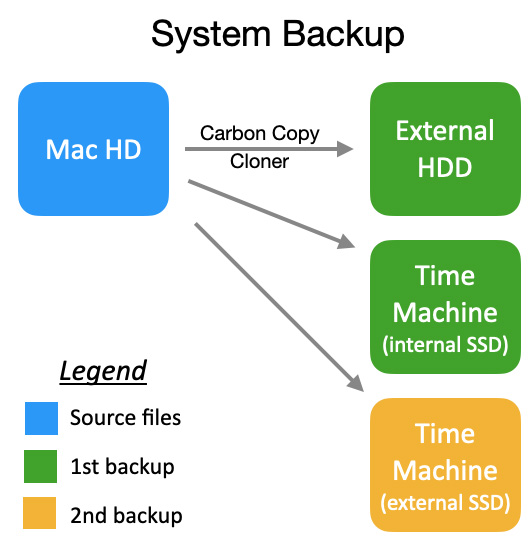
I make three backups of my Mac internal drive:
Three separate devices, two different types of backups.
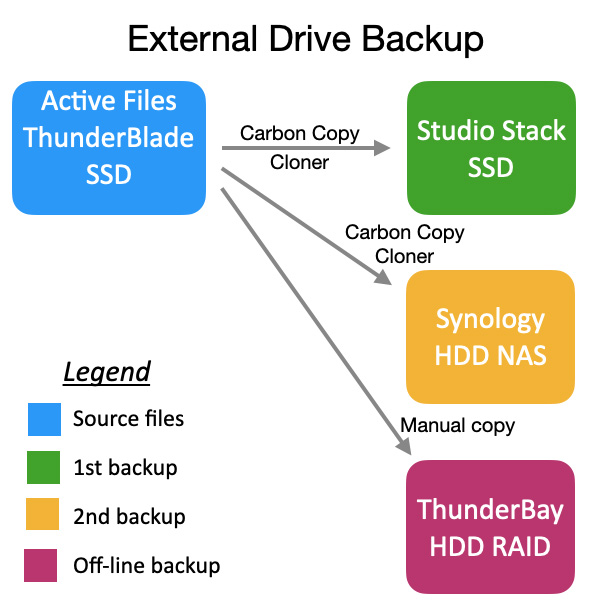
All my active files are stored on an external 8TB ThunderBlade SSD RAID (2 volumes: 6 TB for data & 2 TB for Time Machine backups).
Media backups are stored on the Studio Stack SSD, Synology NAS server, and ThunderBay 4-HDD RAID, which is then unplugged and stored on a shelf.
NOTE: The Synology includes an expansion unit so that all files on the main server are backed up to the expansion unit.
Using Carbon Copy Cloner I make:
While I don’t have any off-site storage – and I should – I do have multiple copies of everything critical on multiple devices
I should also mention that it took me several years to afford all this gear. It isn’t cheap, but losing media costs far more.



17 Responses to How I Backup My Data – and the Gear I Use
Yes, Backblaze can be slow to upload or download when data is needed immediately. However you can greatly reduce the cost by using Backblaze Personal which runs ~$120 a year for unlimited data.
I backup ~75TB of data there.
David:
Thanks for your comment.
For my article, I simply went to BackBlaze’s website and used their recommended pricing option. I did not know there were other levels.
Larry
i also use the BB personal ( @$100) runs in background to back up my mac studio and 8 bay thunderbolt OWC raid. (currently at 50Gb) just as a last ditch backup if all else fails.
I copy my camera/ ic media simultaneously using Hedge offshoot to above raid ( main original archive), 8TB thunderblade ( for working media and transcodes) and a 4 bay raid for back up and CatDV proxies.
( note the newer GoPros “hide” the cameras proxy files: use chflags from command line to see)
I have an old Drobo with much older media as a near-line storage, which uses up those spare older drives.
a couple of years i did buy a OWC thunderbolt LTO8, not cheap but not much more than a big tape raid) every thing is stored on 12TB tapes ( using hedge canister), a couple of times each year, i backup the new files, which frees up the backups on my smaller raid and thunderblade.
i occasionally use CC to make a bootable back up my my system disc
Steve:
Thanks for sharing your workflow. Just for clarity, what is “BB personal?” I also assume that “CC” stands for Carbon Copy Cloner?
You illustrate a key point: you much have multiple copies of your media, just in case.
Larry
You really should extend your backups to include offsite. I know businesses that have lost everything to both fire and theft. I carry a bunch of G-Drives in my car as my offsite backup of current work and archive to 2 different HDD’s –one on site one off site– as the drives fill up. I appreciate that this system does depend on how large your projects are and what disk space they require.
Jason:
You are absolutely correct and I consider myself reprimanded.
I love your mobile offsite storage. I never considered the trunk of my car.
I keep my offsite copies under the guest bed at my mother in laws house (didn’t want to take up a shelf in her closet for 30 drives)
Not a lot of action happening over there in that retirement community so I’d say it’s as safe as it can be….unless she forgets to turn off the stove. : /
Larry, thanks for the tips on software that makes backups easier. Like you, I liked the LTO-4 option when it was affordable, but the Mac compatibility is also a deal breaker for me. I currently keep my old Mac tower hooked up to my old LTO setup so I can access those archives. I should bite the bullet and transfer them to something more current, so I’m thankful for the nudge to think about this again.
On the other hand, I wonder if I’ll ever even need to access that old material. Time for a thorough archive evaluation.
Scott:
You and I both know that as soon as you trash that “old, unneeded archive,” the world will suddenly find a reason why that specific footage is more valuable than gold.
Sigh… That’s been true forever.
Larry
Thanks again, Larry. It’s always good to revisit this topic from time to time given the ever-changing landscape of cloud computing and SSD technologies. I also enjoy learning more about how OWC builds the Studio Stack.
As I mentioned in my last update, since I still work with very old legacy DAW equipment, I rely on some older backup tape technologies methods (e.g., Digital Data Storage tape drives developed in the 1980s). The irony is that these drives actually work extremely well for real-time project backups.
The 3-2-1 rule remains the most reliable approach, but during critical NLE and DAW work, you can truly never have too many backups available.
Philippe:
It was your original email to me that was the inspiration for this article. You are correct, each of us is different and requires support for a variety of systems. The real trick with legacy gear is making sure it reliably interfaces with current computer hardware. Those older drives are still “good,” but if, like FireWire, they can no longer communicate, then the fact they still work doesn’t help.
I’m really glad your older gear is still functioning properly.
Larry
Larry, thanks for your storage rundown. Another option for long term project storage is internal drives with a drive dock to archive large projects. 16TB drives are only a few hundred dollars and can sit on a shelf containing full data archives for years. I have a whole shelf of these in the black storage boxes from OWC and have not lost a single one in 20 years. Man crosses fingers and knocks on wood. 😉
Brad:
This is another good comment. However, based on conversations with OWC engineers, I recommend that you make a point to spin up each of those drives once a year and let it run for a few minutes. This keeps the lubrication from “locking up,” and allows the heads to skim across the data and fix any problems caused by fading magnetism.
Fromm what I’ve been told, there’s no utility we need to run – just let the operating system survey the disk.
Larry
Thank you for talking about the “elephant in the room” with cloud storage. Almost every year since the big Sony Studios hack I get at least one (if not more) free credit monitoring subscriptions from some studio or payroll company that reports they’ve been hacked and my personal info has been breached.
It’s so common, I’m never surprised any more–and it has totally put me off storing my audio/video back-ups in the cloud. I keep HDD’s off site at a storage facility, but you’ve got some great alternatives I’ll be looking into as well. Much appreciated!
Thanks for this important conversation! I love hearing what you and others do for backups. I use Brad’s system – lots of external drives that get switched out regularly. Who knows – I may be spending as much on drives as I would with another system with how much redundancy I have! But it works for me 🙂
When I was still working, archiving to blu-ray with a gold cd-rom as the second backup was what I considered bulletproof. But now it’s getting harder to source blank media, Sony got out of the game a year or two back. And it was a pain trying to convince management to buy a couple extra drives and just leave them in their packaging in storage, unopened, as spares. Some folks just couldn’t wrap their minds around thinking that for ahead, and the concept of banking extra hardware without using it blew their minds as “wasteful “.
The timing of this write up is great. Every year around the holidays, I find myself digging into an old drive, finding photos that we’re going to use for some sort of creative gift to give to somebody and my wife came into my home office the other day and said, “What the heck do normal people do? They don’t know how to do all the stuff that you’re doing with all the files and data. I don’t know what I would be doing with all my iPhone photos and everything if you weren’t around!”
My response was, “Well I appreciate that you see the value in what I’m doing here but I can tell you it sure ain’t fun to deal with, but what else am I going do? Don’t want to lose the only window to see back in time since it’s all just on a drive/ssd nowadays” Lol