
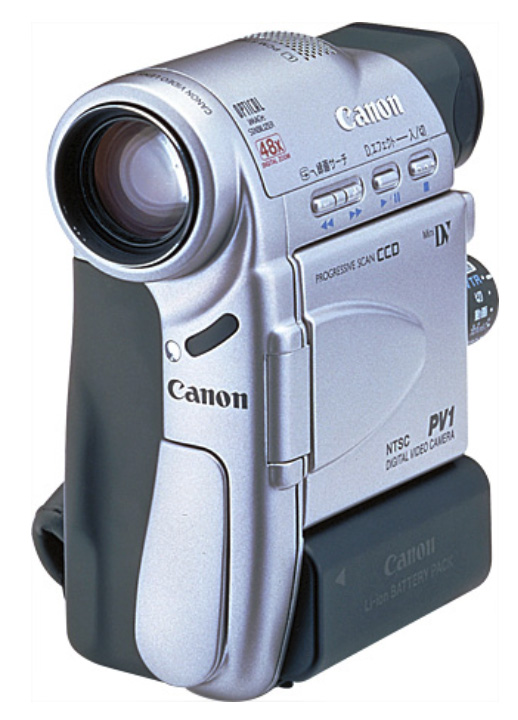
 It is no exaggeration to say that FireWire was a key enabler of the digital video revolution. I clearly remember my surprise – and joy – when I first connected my Canon Elura video camera to my Macintosh (as it was called back in 1999) via a simple FireWire cable.
It connected instantly, with no fiddling around. And the images blew me away: High-quality, standard definition, progressive video from a camera that fit in the palm of my hand!
 FireWire supported the full digital stream from camera to computer. No conversions, no image quality tradeoffs, full video frame with full 48K stereo audio transferred at a blistering speed of 50 MB/second! Suddenly, a whole new world of portable video and non-linear editing was at my doorstep – and Apple Final Cut Pro version 1.2 was there as a video editor specifically designed for that world.
My life has not been the same since. Nor, I suspect, the lives of many, many other filmmakers.
NOTE: While the sensors and lenses of these small cameras could not match the image quality from a studio camera with ten thousand dollar lenses, FireWire was not the gating factor on image quality. It transferred every pixel untouched.
Twenty-six years later, while digital video is now firmly established, Firewire’s role in the story is ending. macOS Tahoe no longer supports FireWire.
Kit Laughlin commented: “Because I have dozens of old FireWire 400 and 800 HDDs, I will not be updating. I will very interested to see how many of these old drives can be read, and contents transferred…”
The FireWire specification is IEEE-1394. (FireWire was an Apple brand name. Most PCs referred to it as IEEE-1394, though i.Link (Sony) and Lynx (Texas Instruments) were also used. It was similar to USB-2 in speed, though not in configuration.
Allan Tépper recently blogged: “For those of you [who] mistakenly believe that you are immune if you have a converter from FireWire to Thunderbolt, you are not. The only current solution is to use an older version of macOS, up [to] and including Sequoia (for FireWire video devices and FireWire hard drives, not for FireWire audio interfaces, which were removed from Core Audio earlier).”
Last week, I spoke with Thomas Coughlin, past President of the IEEE, asking if it were possible for a third-party company to release a FireWire-to-USB converter. Tom said that it was most likely possible technically, but the bigger issue was licensing. Existing licenses may not allow it. In other words, while a third-party converter may be possible, it isn’t likely.
NOTE: Based on past history, I don’t see any case where Apple will bring back Firewire, nor make an Apple-branded converter.
If you have any data on any FireWire devices that you need to keep, this is your last opportunity to get it transferred to USB or Thunderbolt storage or lose it entirely. This incudes all data stored on DV and DVCAM tapes, unless you have a drive that connects using SDI, S-Video, or analog RCA cables. However, only SDI will deliver image quality equal to FireWire.
NOTE: If you are looking for a codec to transfer your DV / DVCAM media into, use ProRes 422. That equals the spec of all SD cameras. You can use ProRes 4444, but you won’t get any better images with it.
FireWire has taken us all on an amazing trip: Fast speeds (for then), image quality equal to what the camera could create and an extraordinary ease of use. It opened worlds we never knew existed. And provided filmmakers around the the world with new ways to tell their stories.
That is a legacy to be proud of.



18 Responses to Farewell FireWire! Yours Is a Proud Legacy
Newer Comments →-
 Norm Bowdler says:
October 20, 2025 at 2:53 am
-
 Malcolm McKinnon says:
October 20, 2025 at 3:03 am
-
 Mike Janowski says:
October 20, 2025 at 4:09 am
-
 David Barnes says:
October 20, 2025 at 4:46 am
-
 Eric Dean Freese says:
October 20, 2025 at 5:28 am
-
 Philip Snyder says:
October 20, 2025 at 6:32 am
-
 Larry says:
October 20, 2025 at 6:36 am
-
 Craig Seeman says:
October 20, 2025 at 7:44 am
-
 Larry says:
October 20, 2025 at 8:02 am
-
 Larry says:
October 20, 2025 at 2:43 pm
-
 Kit Laughlin says:
October 20, 2025 at 1:17 pm
-
 Larry says:
October 20, 2025 at 1:34 pm
-
 Clayton Moore says:
October 20, 2025 at 1:53 pm
-
 Larry says:
October 20, 2025 at 2:40 pm
-
 Gene Massey says:
October 21, 2025 at 8:19 am
Newer Comments →Bit of a tear in my eye reading this…:-(
as an old friend of mine said back in the 90s.. the world moves on and we must move with it…
This is why it pays to retain at least one older machine with ports, OS and software still good to capture old footage.
“If you still have media on FW media…” WHAT ARE YOU WAITING FOR? Copy it today!
Amazing – thanks for the heads up on this Larry – I have several of my old Mac Pro towers with all the way back to OS X Snow Leopard running on them due to needing to support older video and audio interfaces, that were expensive in the day , and they still get the job done.
I had to create a DVD last week (in DVD Studio Pro!) for a client, and now Firewire support is leaving. I may get accused of “hoarding” technology, but this is why there is a 2012 Mac Pro on standby in my edit suite.
I have a couple of drives that are USB 2.0 and 3.0.
Will they work on Tahoe OS?
Phillip.
USB is fine. It is only FireWire that is discontinued.
Larry
Not great if you’re a documentarian. I have hundreds, if not thousands of hours on DVCAM and MiniDV and a DSR-11 deck for input.
So much for the claims about videotape being a better archival format than file-based archival. Remember those fights?
It’s impossible for small productions to keep having to transfer files to newer formats every few years. Ironically, I once did an archival project for PBS Dance in America in which we transferred 2″ to D2 and then DigiBeta. They had a tough time finding in-service 2″ machines.
Consider that Apple was a big proponent of Firewire when it came out. The whole thing is a nightmare. They really need to keep the adapters (firewire to thunderbolt or USB-C) alive and possibly have an OS or FCP plugin for those who need it.
Sometime old tech can’t die when you’re involved in archival footage.
Craig:
Totally true. HOWEVER, if you can get a DSR-1800 ($395 on eBay) or a Sony DSR-1500 deck (also Ebay), both of those have SDI outputs. It is easy to get an SDI to USB converter. USB is not going away anytime soon. FireWire tape has a 30-35 year life span, so at some point you’ll want to transfer as many of these as possible. Converters are available at B&H, along with other outlets.
But getting a different deck with SDI outputs should buy you more time to figure out how to do so.
SDI yields the same image quality as FireWire, but requires an adapter to convert to USB.
Larry
Craig:
As Clayton points out a bit later in the comments, a Blackmagic recorder handles SDI natively with no adapter required.
Larry
I am keeping one of the original 27″ iMacs with the FireWire 800 port (and FW 400–800 cables are easy to find) for just this purpose. Thanks for reminding me to do this mounting and transferring exercise sooner rather than later!
Kit:
Good idea. I went through the (expensive) process of converting all my DV and DVCAM tapes to ProRes about five years ago. And the last of my FireWire drives was transferred a couple of years ago. Tech moves on and we need to think about what we need to do to protect ourselves against premature obsolescence.
Larry
Here is my suggestion based on experience with my new Mini M4 Pro / Tahoe 26.0.1.
I already had a Blackmagic Design UltraStudio 3G Recorder SDI/HDMI to Thunderbolt ($149). (Link) That unit needs the free drivers of course “Desktop video 15.1”.
That also installs the “Media Express” software which will capture whatever comes in either SDI or HDMI. You can set the capture file preferences for QuickTime uncompressed or ProRes any variety or DVCPRO 50 or whatever.
In my case, I own a consumer Canon HV40 HDV/DV mini DV Tape camera that conveniently has a full-size HDMI port. Capturing HDV or even 20-year-old DV tape is a breeze. The files all appear fine. I suppose since the Blackmagic recorder can import SDI or HDMI, one of these higher-end tape decks with SDI out should function similarly. Try at your own risk of course, I found I had to putz around a bit which element got powered on or launched 1st but no biggie.
On a side note, Tahoe plays back files using QuickTime Player with rounded corners. Don’t let that freak you out ……….LOL!!!
Clayton:
This is a great series of tips. Thanks for sharing. Also, good to point out that a Blackmagic Recorder, which records in ProRes, handles SDI natively. No adapter needed.
Thanks!
Larry
Being old really pays off. I have a 2012 MacBook Pro that has a FireWire port. Dual system with 10.9.5 and Mojave.