
 I was curious. While you probably wouldn’t pick an NLE based upon its export speeds, performance tests are always interesting.
This time, I wanted to compare render and export speeds between Apple Final Cut Pro 11, Adobe Premiere Pro 2025, and DaVinci Resolve 20. And, at the same time, see how much storage bandwidth (speed) each needs.
THE PROJECTS
I created two projects: One using ProRes media which takes advantage of the media engine in Intel and Apple silicon systems. The other using DVCPRO HD media, which doesn’t. Both output to ProRes 422.

OK, yeah, it’s ugly as sin. Sigh, you work with the media you have.
Each project ran 30 minutes, with a title created in Photoshop and drop shadow created by the NLE. An inset video was added, scaled 50%, rotated 30°, blurred, and desaturated. These effects require both CPU and GPU attention. The same settings were used for all projects.
I then exported each project twice, timed the results, averaged the totals, then measured CPU and GPU loads along with data transfer rates between storage and computer.
MY GEAR
I ran this test using a M2 Max Mac Studio, 64 GB of RAM, 2 TB of storage running macOS 15.6.1. (There are a few faster systems, but the speed ratio between the three software should be very close.)
The KEY to fast exports is storage speed and capacity. For this test, I’m using an 8 TB OWC ThunderBlade, connected via Thunderbolt 4, with a maximum read/write speed of 2,850 MB/second.
To make sure storage speed would not be an issue, I played media from the ThunderBlade and recorded the final output to the desktop of my internal drive
THE RESULTS – PRORES
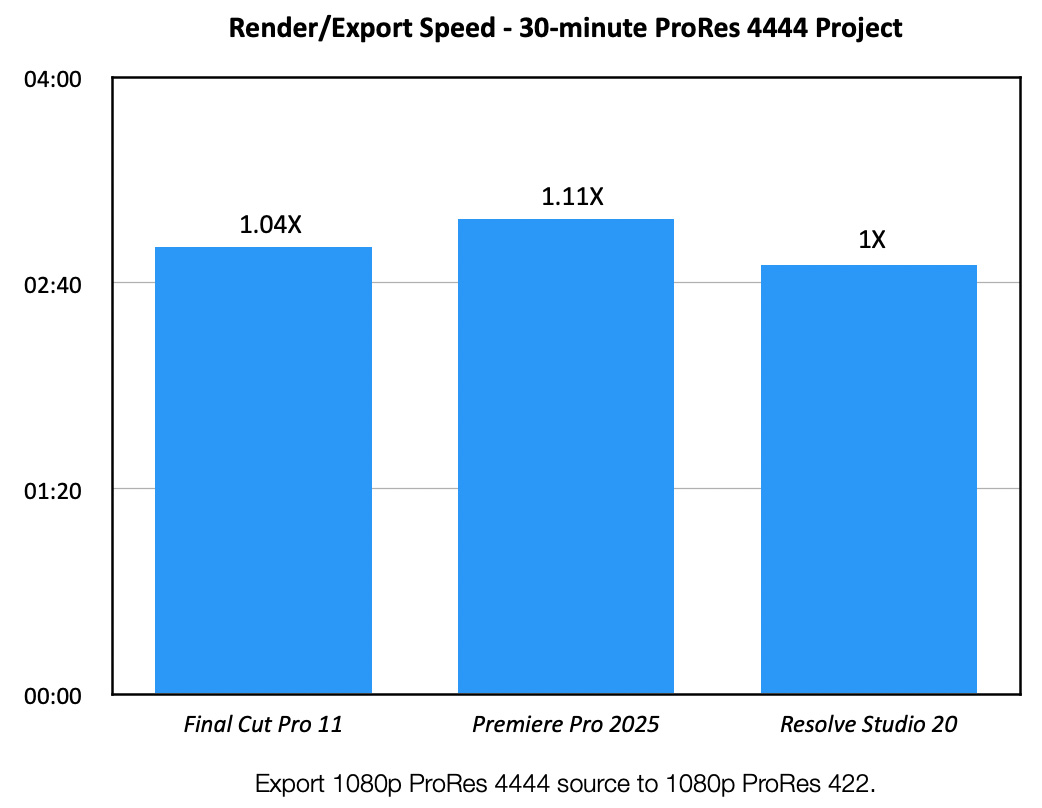
When exporting a ProRes 4444 project to ProRes 422, speeds were very close. However, Resolve 20 was the fastest, followed seven seconds later by Final Cut, while Premiere took 18 seconds longer.
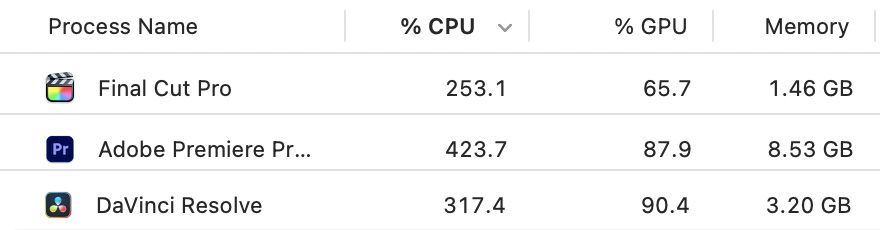
FCP was most efficient in using both CPUs and GPUs, but even Premiere did not use the full resources of my system. CPU percentages are based upon the number of cores, while GPU percentages are based upon an arcane system known only to warlocks. Neither were maxed out.
NOTE: Each test was run individually. These charts and tables were composited after all tests were complete.
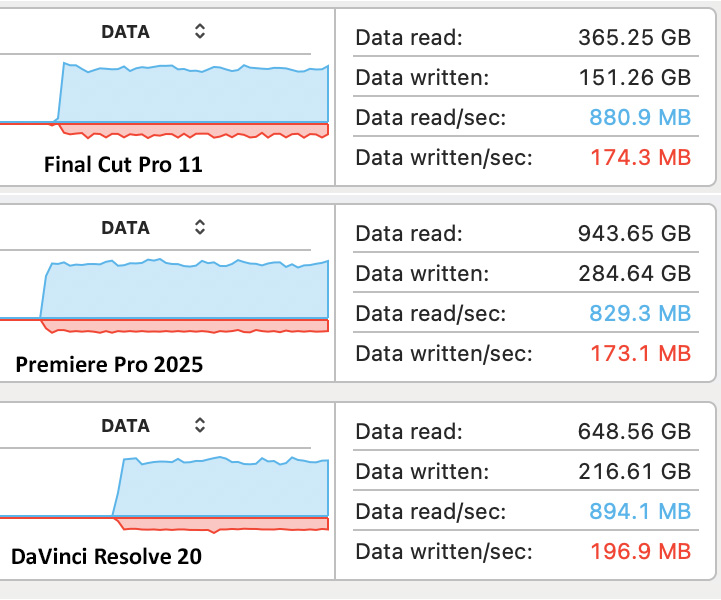
The KEY result I wanted to learn was how much storage bandwidth each of these used. In ALL cases, no software required more than 950 MB/second. (Blue numbers indicate read speeds, red numbers indicate write speeds.) Because multiple clips were playing at once, read speeds are expected to be faster.
NOTE: No project was rendered before exporting began.
THE RESULTS – DVCPRO HD
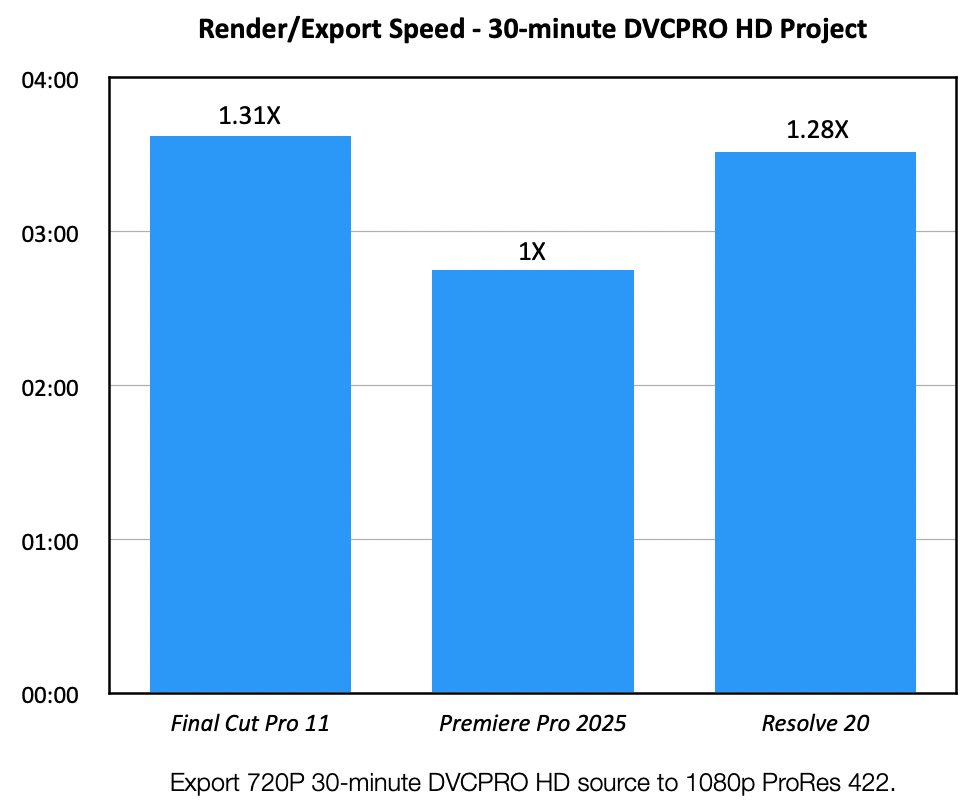
Turning our attention to an older video format, not supported by the hardware-based media engine in any CPU, not surprisingly, export speeds were slower. But not slower by much. The media engine surely boosts speeds, but overall output speeds were still relatively consistent between the three software.
This time Premiere was the fastest. While I’m not sure why, I suspect due to its longevity in the market. It was optimized for DVCPRO HD many years ago.
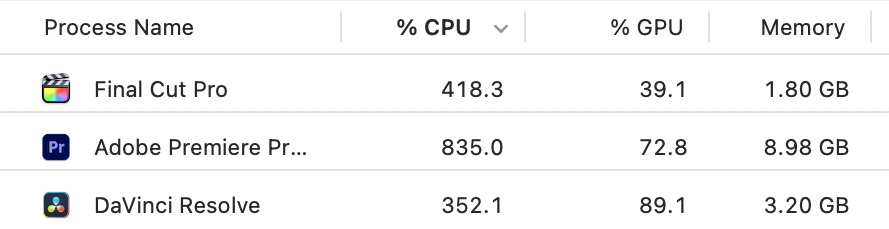
Premiere’s efficiency is born out when we look at how hard the CPUs were working. Essentially double the effort compared to the media engine results above.
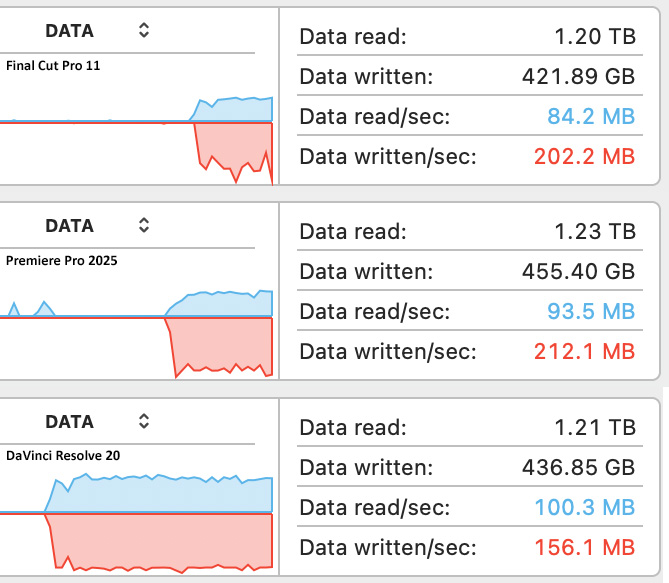
The slower export speeds were also explained by the much lower storage bandwidth. All three apps were running at a fraction of the speed of processing ProRes files.
This indicated that the system needed a lot more time to process the media.
SUMMARY
There are many take-aways from these tests:
The world will not end if you don’t have the fastest system. Export quality is the same, regardless of the speed or configuration of your computer. But, I found these results interesting and wanted to share them with you.



4 Responses to Compare Render & Export Speeds Between Final Cut Pro 11, Premiere Pro 2025 and Resolve 20
Thanks for this comparison!
While a completely different test, would be curious to know how amount of RAM figures into processing speed on the 3 NLEs
Howard:
Smile…. If you want to buy me several Mac Studios with different amounts of RAM, I would be DELIGHTED to test this. Sadly, I have a limited number of computers to play with at the moment.
However, the amount of RAM doesn’t really affect processing speed. All NLEs cache media, so they are only working with a few seconds – generally 2-4 – at a time. This minimizes the amount of RAM needed at any given instant. What WILL affect processing speed is the number of cores and the type of processing being done. Position and scaling are handled by the CPU, anything affecting the look of a pixel is handled by the GPU. Generally.
Larry
Thanks for the baseline tests, Larry. You gave me some ideas on the DAW side that I may also consider for future testing, though this tends to be less computationally intensive than NLE.
Philippe:
Let me know what you find out.
Larry