
 Last week provided a unique (for me) perspective into the perils of AI for video editors. It began with an email from Andrew:
Please may I ask, how does one “unflatten” a Multicam clip in DaVinci Resolve? For example, the multicams have been edited, graded, and then the client says, “Oh please can we now cut to the wide on that shot instead of the close up!” Is there a way to get the clip back into a Multicam to make that change?
I did a quick search of the DaVinci Resolve User Manual for version 19.x and replied:
“You can’t.
“By definition, flattening removes the sync between all the clips, deletes all unused media in the timeline – but not the Media Pool, and moves all clips down to V1. It is undoable, but only if you undo immediately after flattening. The only way to insert a wide shot later is to do so manually.”
Then, things got interesting.
AI image courtesy of Google DeepMind, via Pexels.com.
Andrew replied:
I found something about “decomposing” the flattened multicams whilst researching this, I’m not sure this works but this is what the AI overview thought:
Reverting to Multicam:
If you decide you need to work with the multicam clip again, you can “unflatten” or decompose it.
Steps to Decompose:
Hmm… Perhaps I was wrong. I went back to the Resolve User Manual and did a more extensive search.
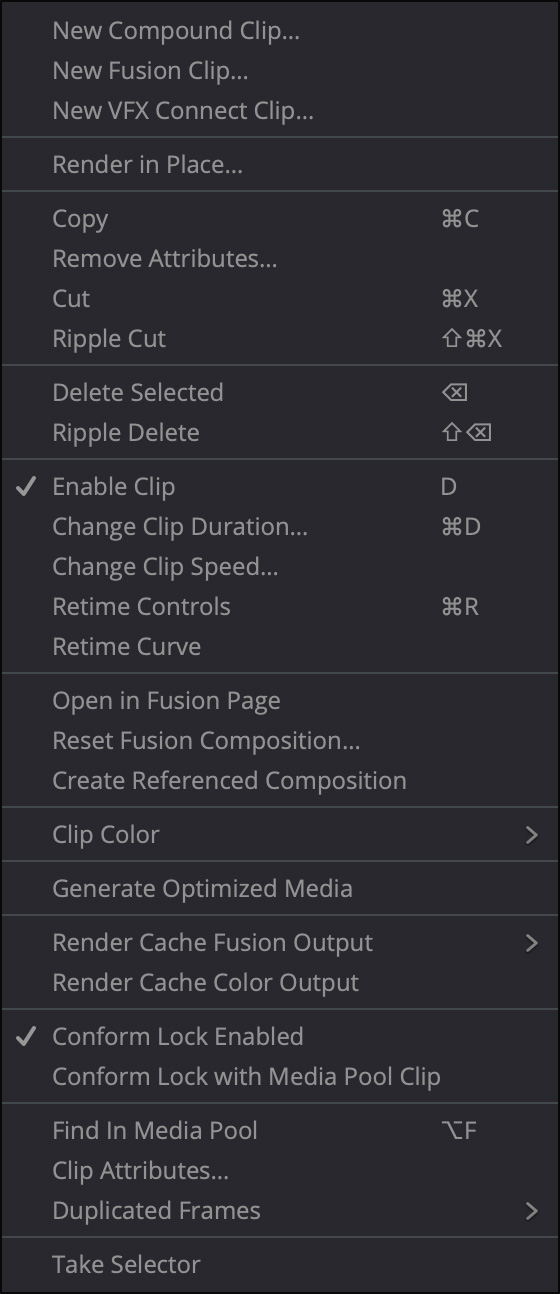
This screen shot shows what appears when you right-mouse-click on a flattened multicam clip in Resolve. “Decompose” and “Unflatten” are not options.
I mention this email exchange because it clearly illustrates the challenges we face in deciding whether the information any AI service provides is accurate. Clearly, the reply sounded plausible, it was formatted prettily, and, in fact, it looked like it was copied from a manual. It was just wholly inaccurate.
This error was easy to discover, but as our questions get more complex, sorting truth from hallucination will only become harder.
I’m not saying: “Don’t use AI,” AI is now firmly a part of our lives. But I am saying that we need to continue to view AI answers with some skepticism.



2 Responses to Cautionary Tale: The Personal Perils of AI
Of course Multicam the timeline was duplicated before being flattened ?
I have found the AI in the Ray-ban Meta glasses to be useful for the ability to ask questions hands-free. So, I purchased a second pair of prescription Ray-ban Meta glasses to wear while editing in Adobe Premiere. I am constantly firing-off questions about the Premiere interface, without having to leave the application. The AI is helpful probably 75% of the time, but I often see similar behavior, where the AI describes a menu option that doesn’t appear for me. Rephrasing the question sometimes helps. In the future, we may need to specify which version of an application we are using, as software applications evolve and features frequently get replaced or renamed.